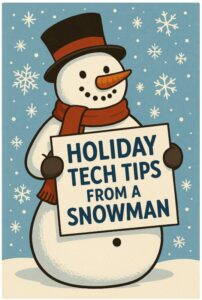
24 Holiday Tech Tips From a Snowman
-
Don’t get snowed by phishing emails — check the sender twice before you click! - Keep your passwords as strong as an ice storm — long, unique, and
never reused. - Freeze out scammers by turning on Multi-Factor Authentication.
- Avoid frosty surprises — update your devices before the holidays get busy.
- Snowflakes are unique, and your passwords should be too!
- If a message feels “icy” or off… don’t click.
- Warm up your accounts with backups — cold weather won’t save your data!
- Don’t let your holiday shopping melt your wallet — stick to trusted websites.
- Keep your Wi-Fi wrapped up tight with a strong password and encryption.
- A snowman never shares his scarf… or personal information.
- Bundle up your files with encryption when traveling.
- If someone asks for gift cards as payment — that’s colder than a blizzard. It’s a scam!
- Don’t let your inbox turn into a snowdrift — delete suspicious messages.
- Your apps need coats too — update them regularly!
- Public Wi-Fi is as risky as thin ice — use a VPN if you must step on it.
- Keep your devices from “chilling out” unattended — lock them when not in use.
- Beware of “too cool to be true” holiday deals.
- Before you travel, make sure your devices are backed up… just in case they slip on ice.
- Don’t post your travel plans — burglars love an empty igloo.
- Smart home devices need holiday cheer — review their security settings!
- 21. Watch out for fake delivery notices — scammers love porch pirates AND snowmen.
- Use strong PINs — not your birthday or “1234-snow.”
- Be careful with QR codes — some are colder than the North Pole.
- Keep the holiday spirit high and your cybersecurity higher!

Buying Gift Cards? Be Cautious!

Buying Gift Cards? Be Cautious!
Buying and Using Gift Cards
Gift cards are for gifts. Only gifts. Not for payments. Never buy a gift card because someone tells you to buy one and give them the numbers. Whenever you buy gift cards:
- Stick to stores you know and trust. Avoid buying from online auction sites because the gift cards may be fake or stolen.
- Inspect the gift card before you buy it. Make sure the protective stickers are on the card and that it doesn’t look like someone tampered with them. Also check that the PIN number on the back isn’t showing. Pick a different gift card if you spot a problem and show the tampered card to a cashier or manager.
- Always keep a copy of the gift card and store receipt. Take a picture of the gift card and store receipt with your phone. The number on the gift card and store receipt will help you file a report with the gift card company if you lose the gift card or if you need to report fraud.
1. Shop Smart and Stick With Trusted Retailers
-
Buy directly from official websites or well-known stores. Be cautious of unfamiliar sites with prices that seem too good to be true – they often are.
-
Compare prices before you buy. Knowing what an item normally costs helps you spot suspicious deals or counterfeit products.
-
Look out for website clones: Always check the web address when shopping and watch out for website clones that might have a name like a real retailer (amazon_deals.co, for example).
2. Protect Your Payment and Personal Info
-
Share only what’s necessary. If a retailer asks for more personal info than you’re comfortable providing, shop elsewhere.
-
Use credit cards. They often include stronger fraud protection than debit cards.
-
Watch out for weird payment requests: Any retailer that doesn’t accept major credit cards is suspect, like if they want payment through Zelle, Cash app, or cryptocurrency (like bitcoin).
3. Secure Your Accounts
-
Use a strong, unique password at least 16 characters for each shopping or banking account — and store them in a password manager.
-
Turn on multifactor authentication (MFA) wherever possible for extra protection.
-
Keep your devices up to date with the latest software and security patches.
4. Watch Out for Scams and other CyberGrinches
-
Be skeptical of emails, texts, or ads that offer unbelievable deals or ask for personal info. They may be phishing attempts.
-
Avoid buying from resale sites where automated “Grinch Bots” hoard popular items and resell them at inflated prices — often with higher risk of fraud.
-
Report suspicious messages to your email provider or IT team.
-
Look out for delivery scam texts: Look out for text messages from USPS, FedEx, UPS, and DHL asking for tracking numbers or payment, or announcing delivery delays. Shipping companies won’t ask for extra “fees” for products you order online – check with the merchant for updated tracking information.
5. Monitor Your Accounts
-
Check your bank and credit card statements regularly. Flag and report any unfamiliar charges right away.
-
Set up transaction alerts to catch fraudulent activity quickly.
-
Freeze your credit by default with the 3 major credit bureaus (Equifax, Experion, and TransUnion) and unfreeze it when applying for credit. It’s free and doesn’t impact your credit score!
6. Stay Safe While Shopping on Social Media
Social media platforms can make holiday shopping feel fast and fun, but they’re also prime territory for scams. Fake accounts and ads can lead to fake products or phishing sites. Before clicking “Buy Now,” double-check:
-
Is the account verified? Check the profile’s history of the seller.
-
Check websites: Does the store have a legitimate website with clear contact information? Go beyond the social media marketplace.
-
Read reviews closely: Are reviews consistent and authentic looking?
-
Be extra careful on social media: There are many scam ads offered through social media, so look through reviews and do more research before purchasing.
If something feels off, don’t click the link or continue corresponding with the seller.
Keep the Cyber Spirit All Year Long
Good online shopping habits are actually smart practices to follow all year round.
Give yourself the gift of peace of mind: stay alert, stay secure, and make cybersecurity part of your everyday routine.
Thanks to The FTC Consumer Advice
12 Tech Scams of Christmas!
Phishing scams are an ongoing problem, however there is a HUGE increase in the number of scams that start around Thanksgiving and go through Christmas. Cyber-criminals take advantage of distracted staff to launch targeted attacks. Over the next 12 days we’ll highlight some of the most popular scams that you should be on the lookout for this holiday season.
- Fake Shipping Notifications: We recommend that you do NOT click on ANY tracking links from FEDEX, UPS or the USPS. Instead, go directly to their website and type in the tracking number in question or log in to your account and check open orders directly.
- Email Deals: Don’t click that deal! If a sale sounds too good to be true, it probably is. Ask yourself, “Did I sign up for emails from this retailer? Did I ever supply my email address to this site?” If the answer is “No,” then immediately delete the email. Remember: on your computer you can hover over the link and check for typos, repeated letters, or strange words in the link that could indicate an impostor website. If you’re really interested in the sale, go to the retailer’s website or inquire with customer service to see if the sale is real.
- Online Shopping: It’s best to type in the URLs of your favorite holiday shopping sites manually, and only click top-ranked search results when browsing. This precaution will prevent any “malicious” links with executable codes from installing something nasty on your computer or device.
- Santa Letter Scams: Knowing that every child would love a reply letter from Santa, phishers manipulate parents’ heart strings by offering great deals on “Santa letters.” Before ordering your child or grandchild a Santa letter, check for reviews and a good Better Business Bureau (BBB) rating. Even then, don’t provide too many details about your child/grandchild, such as their birth date, school name, pet’s name, etc.
- Bogus Charities: Cyber criminals play on our charitable nature during the holidays. Most legitimate charity websites use .org, not .com. Also, beware of charities with copycat names or small variations in the spelling of the website. The best policy is to call the charity directly or visit their website directly instead of clicking on email links.
- Long-lost Friends Scams: Online scammers can also send bogus links from fake organizations through your friends’ contact lists to get to you. These emails look normal, as they’re coming from a familiar name. Ask yourself, “Has this person ever sent me a message like this before? When was the last time I talked to this person?” The best policy is to pick up the phone and ask if they sent you the email. Your “friend” may not know that they’ve been compromised and that emails are being sent out with their account or in their name.
- Social Media Ads: Criminals replicate a legitimate ad (Best Buy, Amazon, Macy’s) and when you click on it, malware or ransomware can be installed on your phone or other devices. Our best advice is refrain from clicking on ads during the holiday season and don’t click on anything while on your phone! It’s more difficult to figure out what’s legitimate and what’s a scam when on your phone. If you see a great deal, go directly to the vendors website. That same deal should be on the site. If it’s not, you can always call customer service and inquire.
- Pet Scams: While a year-round issue, pet scams (puppy scams are the most used) hurt families seeking to add a family member to their household for the holidays. Pet scams are often difficult to avoid as cute pictures, and good deals pull at the heartstrings and wallet. To prevent this fraud, only purchase pets through reputable sources such as: Petsmart, the local shelter, breeders that can provide references or other local adoption agencies.
- eCards: Receiving an eCard, especially at Christmas is not unusual. However, as always, there are bad guys out there looking to take advantage and they see eCards as an easy way to do that. Malicious eCards can contain spyware or malware, designed to infect your computer and steal your data. In some cases eCards have been the source of ransomware, a virus that locks down your files and demands payment to unlock them. Here are some clues that can help you spot a malicious e-card; look out for spelling mistakes and poor grammar and never install .exe files.
- Travel Deals: We all want an all-inclusive trip to London or the Caribbean for $299 – but let’s face it, those deals are either a scam or a time share sales pitch! During the holidays scammers ramp up deals on travel packages from hotel and airfare to cruises hoping to trick people into buying items that don’t exist. In 2018 between Thanksgiving and Christmas this scam cost families more than $7 million dollars. If it sounds too good to be true, it probably is!
- Money Transfers: Got an email from your boss telling you to transfer money? STOP – don’t do it! Well, don’t do it until you verify with a phone call that you’re supposed to send that money. This time of year cyber-criminals ramp up targeting those in finance and HR with phishing emails that look completely legitimate. Many banks and insurance companies are refusing to refund money stolen this way. The best thing you can do is slow down, take a few minutes and call whomever is asking you to send the money and verbally verify that you should.
- IRS & Other Government Scams: Who likes getting a call or email from the IRS? Nope, not me either. During the holidays aggressive criminals pose as IRS agents with the intention of stealing money or personal information. This scam comes in two forms. There’s the nasty email demanding payment or they will confiscate your property and put you in jail. Then there’s the phone scam, or what’s known as “voice phishing” where the phone call phone threatens arrest, or business license revocation if you don’t pay a bogus tax bill. These calls most often take the form of a “robocall,” a text-to-speech recorded voice mail with instructions to call back a specific telephone number and the phone number is spoofed to look like it’s coming from Washington D.C. The IRS will never call you to demand payment, they always communicate via a letter first and then a certified letter.
- BONUS –Don’t Post about travel before or while you’re away: You’re excited to go see Aunt Bee for the holidays, so you start posting on social media about your plans. You want everyone back home to know you’re coming. While your friends and family may be following your posts, thieves and scammers may be as well. An interview with 50 ex-burglars found that 80% used social media to plan robberies! Not only that, some insurers have a “reasonable care” clause in their policy and could deny your claim. Be safe ~ wait until you’re back to post those awesome vacation and family photos!
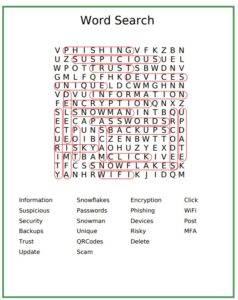
Snowman Word Search Answers